
WhatsApp Cloud API for Teams.Shared Inbox, CRM & Automation in One Workspace.
Connect your WhatsApp Business setup through Meta Embedded Signup, manage customer conversations with your team, keep customer context connected, automate repeatable workflows and run structured WhatsApp campaigns from WAManager.
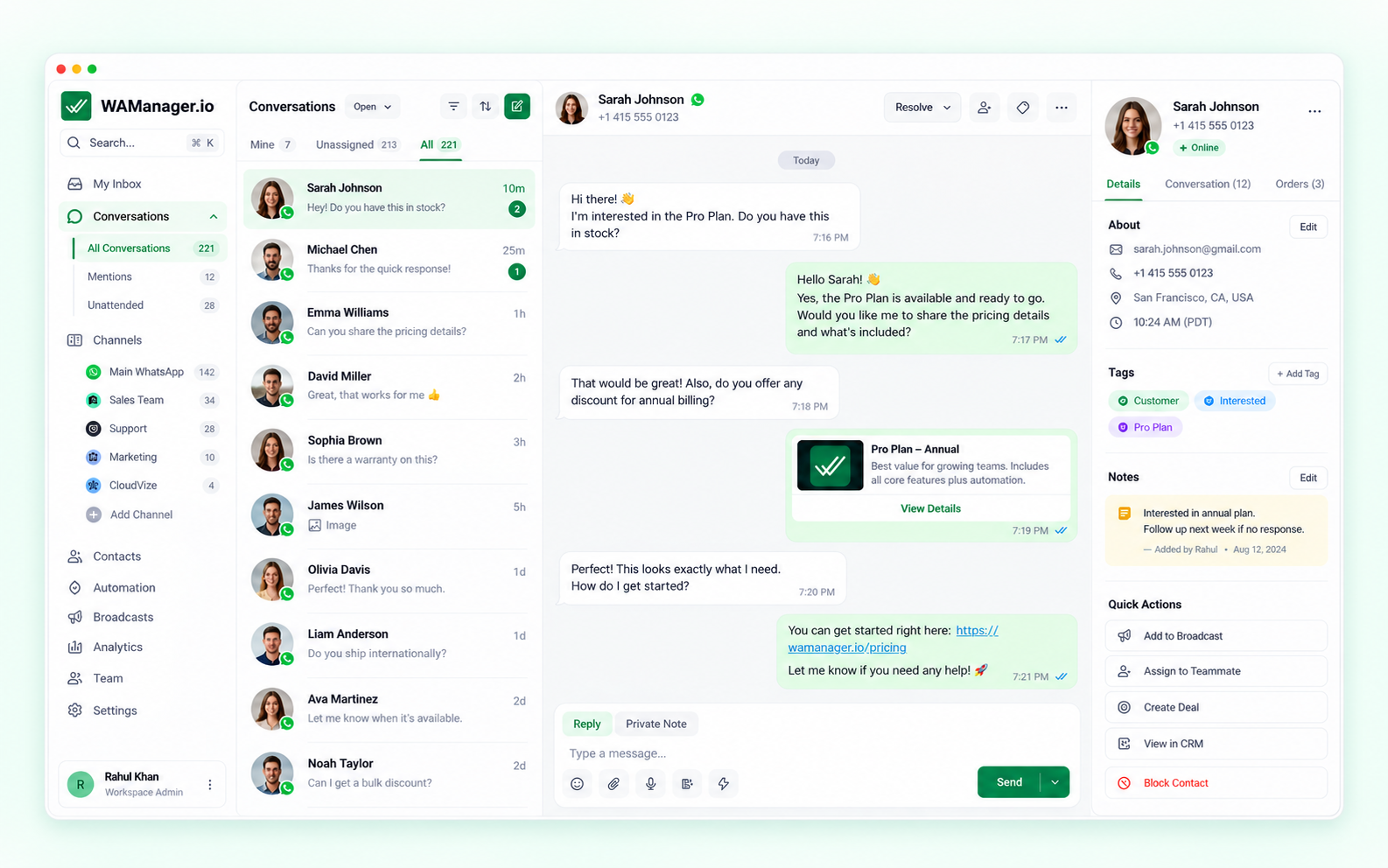
What Is WhatsApp Cloud API — And What Does WAManager Add?
WhatsApp Cloud API provides the messaging infrastructure to send and receive messages at scale. WAManager adds a ready-to-use customer operations workspace — with shared inbox, CRM context, automation and campaigns in one place.
WhatsApp Cloud API
Meta's cloud pipeline handling messaging endpoints, data delivery, and webhook events.
WAManager Workspace
Shared inbox, contact CRM context, thread assignments, automation rules, and campaign workflows.
Sales & Support Teams
Multiple agents manage chats simultaneously with clear ownership, private notes, and interaction history.
FROM INFRASTRUCTURE TO OPERATIONS: WhatsApp Cloud API connects your business to WhatsApp. WAManager gives your team the workspace to manage conversations, customer context, automation, campaigns and reporting — all in one place.
Explore Channel DetailsWhatsApp Business App vs. Cloud API vs. WAManager
Comparing standard mobile messaging, raw cloud infrastructure, and an operational team workspace across 7 core requirements.
| Capability | Mobile App WhatsApp Business App | Infrastructure WhatsApp Cloud API (Direct) | Turnkey Workspace WAManager Workspace |
|---|---|---|---|
| Primary Operating Model | Single phone handset with limited linked web sessions | Raw cloud API endpoints (no user interface included) | ✓Multi-agent commercial workspace on web & desktop |
| Team & Shared Handling | Linked devices (up to 4) sharing one common inbox | Requires custom software development | ✓Dedicated agent logins, role permissions & departmental queues |
| Customer Context & CRM | Basic device labels; no unified customer profile | None provided out-of-the-box | ✓Built-in CRM context: custom fields, tags & conversation history |
| Workflow Automation | Basic greeting & away messages on device | Developer webhooks required | ✓Visual WHEN/IF/THEN automation rules & controlled AI assistance |
| Campaign Operations | Broadcast lists limited to 256 saved contacts | Template endpoints without scheduling UI | ✓Visual campaign scheduler, daily caps, pacing & inbox reply routing |
| Reporting & Visibility | Basic message counters on mobile handset | Raw delivery logs in Meta Business Manager | ✓Team response times, resolution metrics & queue volume analytics |
| Integrations & API Extensibility | No public API or webhook support | Full developer API access | ✓Configurable webhooks, REST API access & external integrations |
From Connection to Collaboration in Five Clear Steps
How WAManager transforms WhatsApp Cloud API from raw messaging endpoints into an active team operating system.
Connect WhatsApp
Guided Meta Embedded Signup onboarding links your WhatsApp Business Account in minutes.
Centralize into Shared Inbox
Incoming messages route into a shared multi-agent inbox where chats receive clear owners.
Keep Customer Context
Access contact attributes, custom CRM fields, and prior discussion history alongside every thread.
Automate Repeatable Work
Deploy visual WHEN/IF/THEN routing rules and configured AI reply assistance with human oversight.
Campaigns & Analytics
Launch approved-template broadcasts with dispatch controls and track team performance metrics.
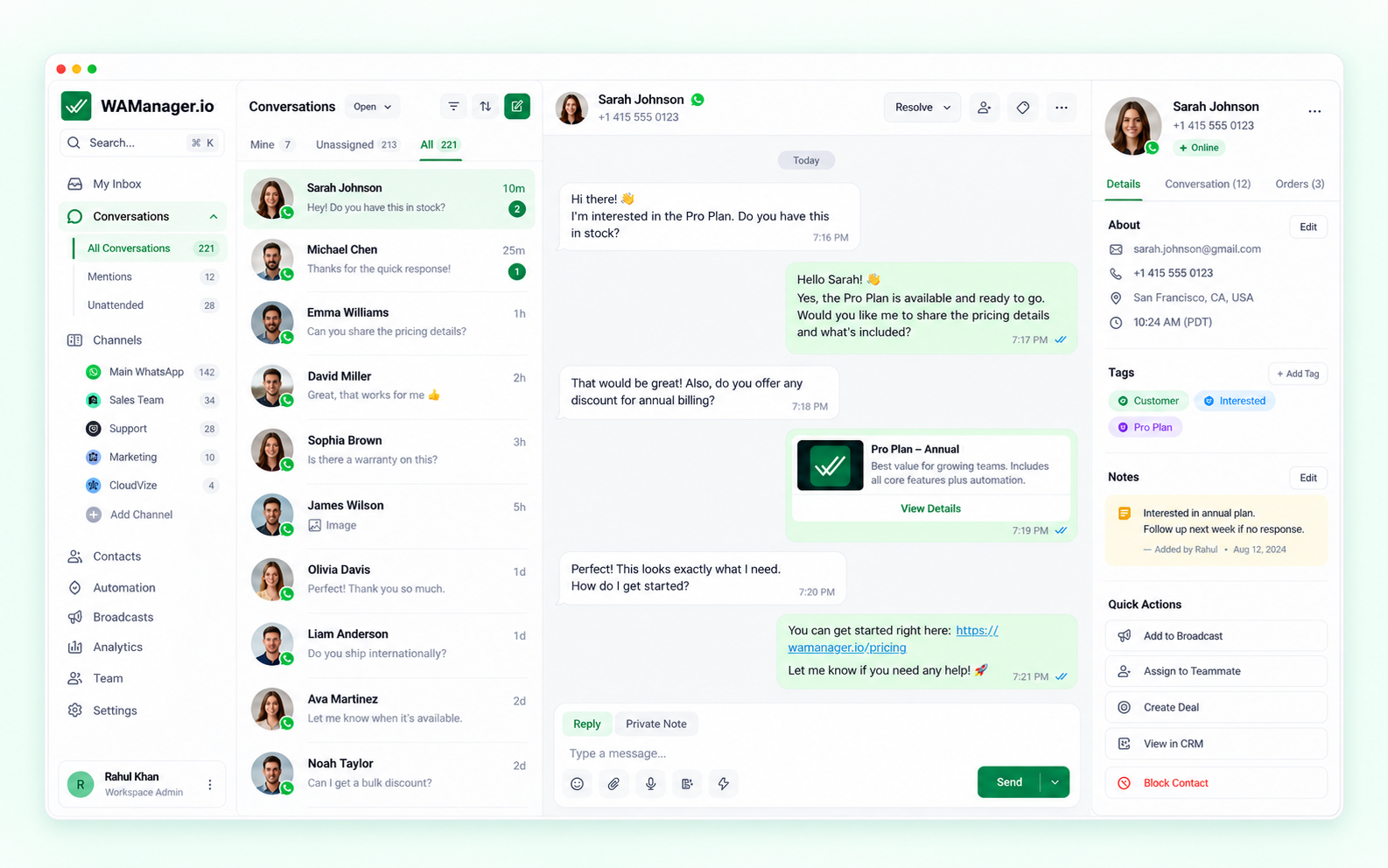
One Operating Surface for Your WhatsApp Conversations
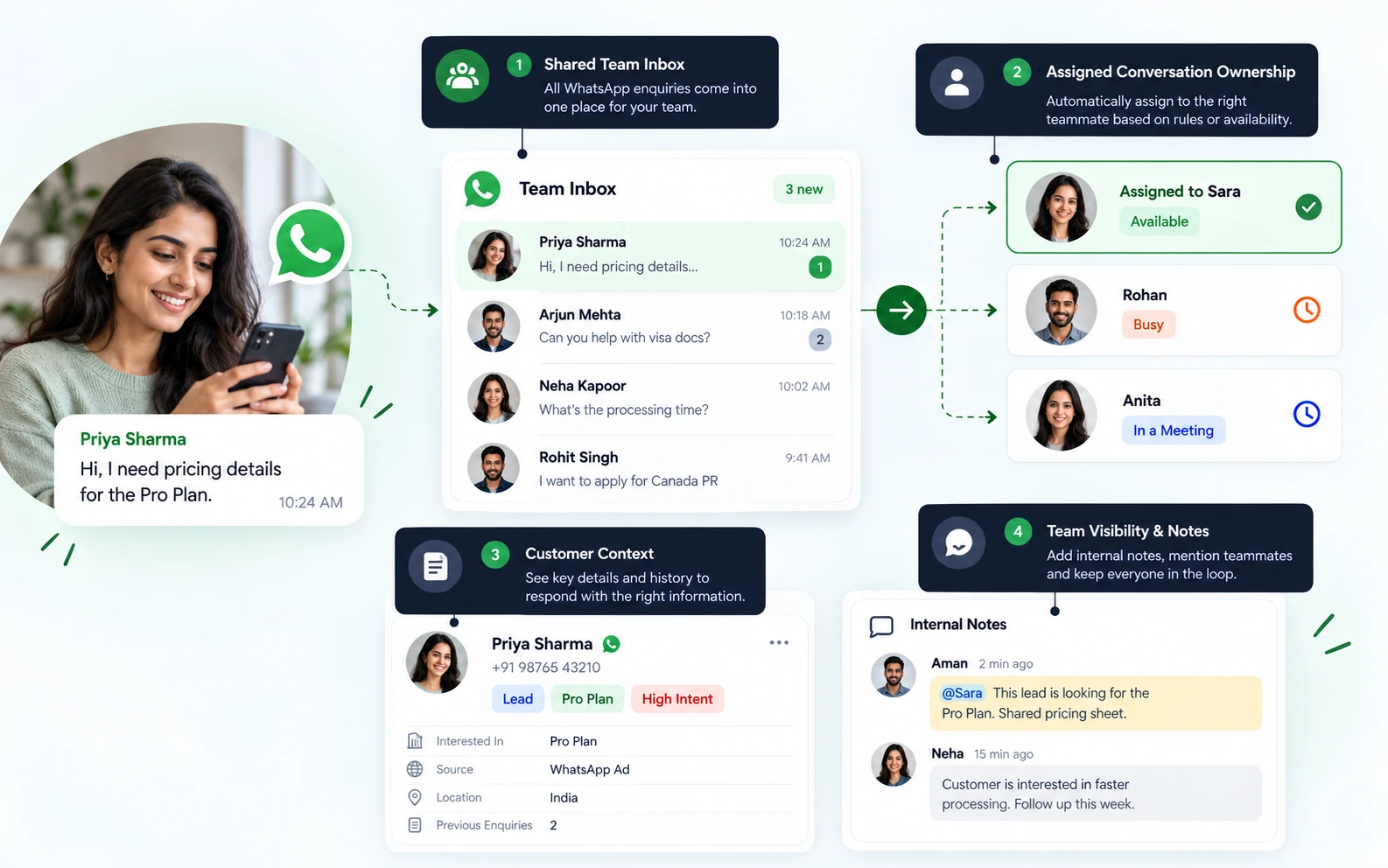
See how WAManager transforms raw WhatsApp Cloud API messaging into an organized workspace with conversation ownership, team queues, and customer context.
Shared Team Inbox
Centralize inbound WhatsApp messages into one unified queue so the entire team has visibility without passing physical phones.
Assigned Conversation Ownership
Assign incoming threads to specific agents or departments (Sales, Support) so customer inquiries never fall through the cracks.
Customer Context
Keep contact attributes, custom CRM fields, and prior interaction history connected alongside every active conversation.
Team Visibility & Notes
Collaborate with private internal notes visible only to teammates, and monitor response resolution metrics across queues.
Automation, AI Assistance & Campaigns Built Around Your WhatsApp Number
Scale routine workflows, draft faster replies, and send structured outreach without juggling fragmented third-party software.
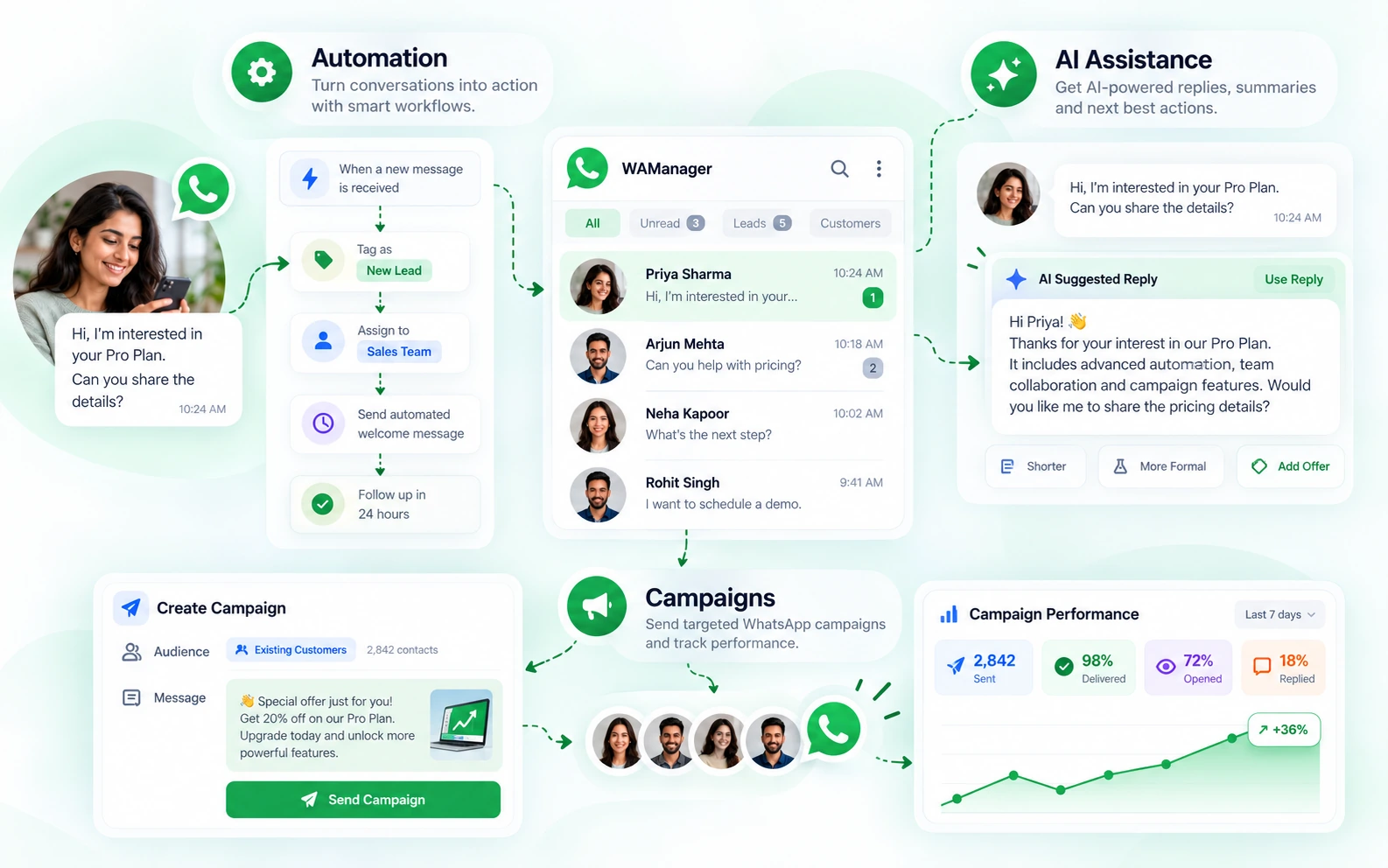
Rule-based customer workflow actions.
Help agents summarize and prepare responses with human oversight.
Structured WhatsApp campaign setup, sending controls and performance visibility.
Need to Keep Using the WhatsApp Business App?
Eligible WhatsApp setups may continue using the WhatsApp Business App alongside supported platform workflows, depending on Meta platform availability, account eligibility and verified configuration.
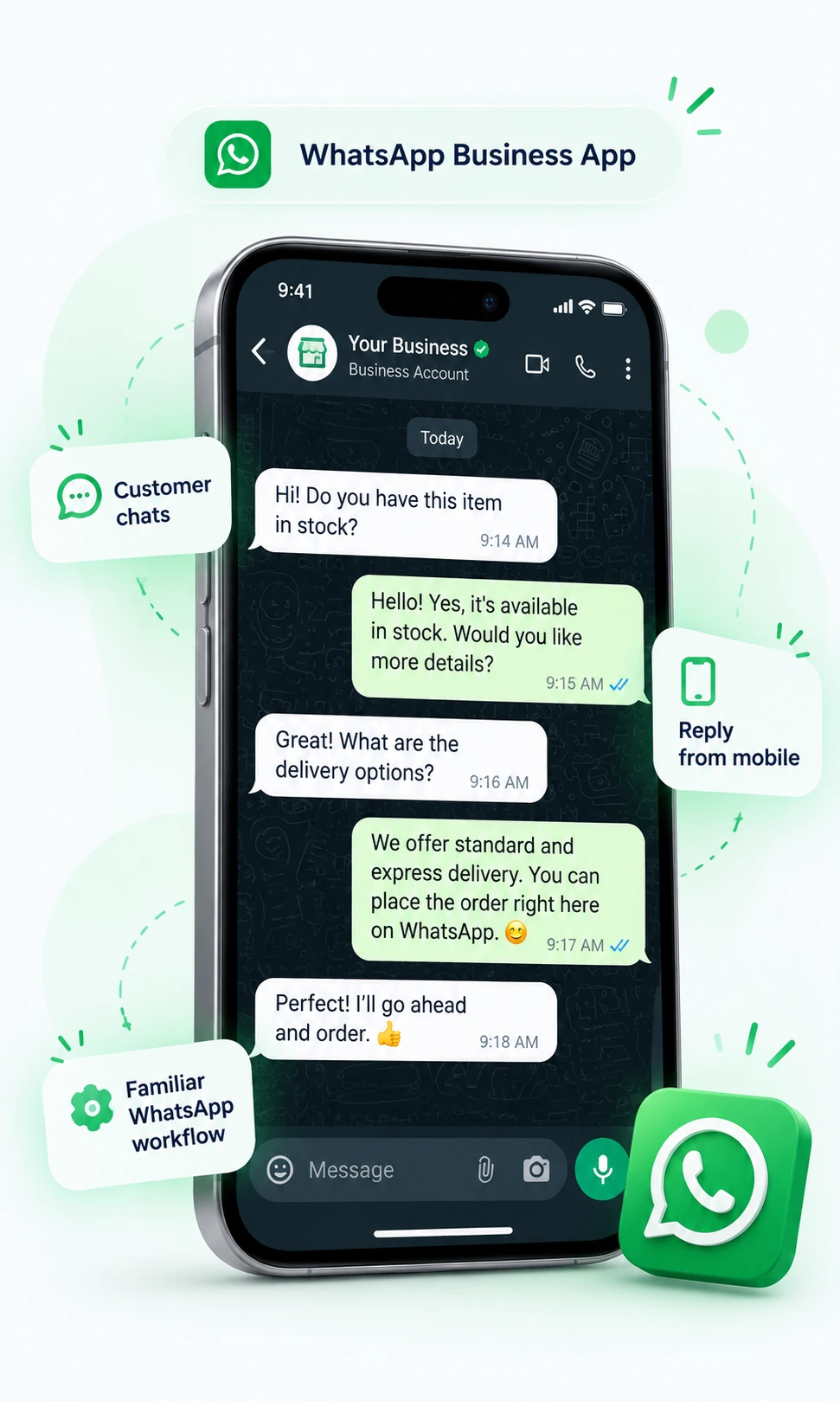
Account Eligibility Notice: WhatsApp Business App coexistence requires supported account criteria and verified Meta configuration. Availability varies based on Meta platform provisions and region.
Transparent Pricing & Operational Trust
Clear separation between your WAManager software workspace subscription and direct Meta messaging charges, backed by strict data governance.
WAManager Subscription
Billed directly by WAManager to power your day-to-day team operations, shared inbox, CRM context, and workflow automations.
- ✓Multi-agent shared team inbox, queues & private notes
- ✓Connected customer CRM with custom fields & thread history
- ✓Visual WHEN/IF/THEN routing rules & Captain AI assistance
- ✓Broadcast campaigns with pacing controls & reply tracking
Meta Messaging Charges
Meta messaging charges are separate from your WAManager subscription and follow Meta’s current WhatsApp Business Platform pricing. Applicable charges vary by message category and the recipient’s market.
- •Separate Meta billing: Applicable WhatsApp messaging charges are billed according to your Meta billing setup.
- •Workspace isolation: customer data & chats remain your property
- •WAManager does not use customer conversations to train shared or public AI models without explicit, informed consent.
- •Human-controlled: AI operates with representative oversight
WhatsApp Cloud API Frequently Asked Questions
Practical answers about WhatsApp Cloud API infrastructure, team setup, coexistence, costs, and WAManager capabilities.
Turn WhatsApp Cloud API Into a WorkspaceYour Whole Team Can Use.
See how WAManager brings conversations, customer context, team workflows and campaign operations together around your WhatsApp Business setup.